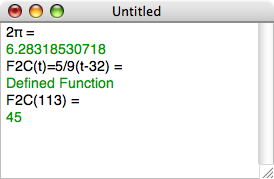
The world may not have needed yet another calculator, but I wrote this while playing with the Spirit parsing library (part of Boost), and maybe some people will find it useful. PlainCalc is a buttonless, algebraic-entry, mathematical calculator with variables and functions. To use PlainCalc, type an expression or assignment and press Return or Enter. Unlike most calculators I've seen, PlainCalc allows you to indicate multiplication by juxtaposition, e.g., you can write 2πr instead of 2*π*r.
As of version 2.5, PlainCalc is on the Mac App Store. New in this version, names of user-defined variables and functions can use almost any characters, even emoticons. Read the online help for details. This version requires macOS 10.15 or later.
Version 2.3 changes:
- The size and position of the window is now stored with documents.
- There is a Preferences dialog where you can set text colors and a timeout.
- The % sign is a built-in constant whose value is 0.01, so that for instance you can write 73% instead of 0.73.
- Improper recursive functions will no longer freeze or crash PlainCalc; instead, you will get a message saying "Timed Out" or "Calculation Crashed".
- If your language preferences specify that the decimal separator is a comma rather than a period, then PlainCalc expects you to enter decimals using the comma, and reports results that way. In this case, you must separate the parameters of a multi-parameter function using semicolons rather than commas.
Version 2.3.1 changes:
- 64-bit support has been added.
- The minimum OS version is now 10.6, hence PowerPC support has been dropped.
- There is a Yosemite-compatible code signature.
Version 2.4 changes:
- PlainCalc can now be used in dark mode (rather than showing black text on a black background).
- Several new built-in functions have been added: deg and rad for converting radians to degrees and back and hypot to take the square root of the sum of two squares.
- Due to code modernization, the minimum OS version is now 10.13.
The source code for PlainCalc is available under the zlib/libPNG public license at GitHub.